YMusic APK Download for Android.
Your music doesn’t have to stop when your screen goes off.
Download the checked YMusic APK, explore the real interface, and learn how to install, update and manage your Android listening. The linked file reports version 3.9.23.
Five-second countdown · verified hosted copy Checked 13 October 2026
See the app before you install
 View screenshot
What is YMusic?
An Android app focused on how you listen.
YMusic is an Android browser and music app distributed through ymusic.io, associated with publisher Khang NT.
It is built around YouTube content. The publisher describes audio playback in the background and an approach that reduces video-data use. Its policy also explains writing downloaded files to device storage.
For a listener, the important distinction is simple: playing an online item, adding it to a playlist and saving a file are separate actions. A playlist is not automatically an offline library, and an available download button does not grant rights to save every song.
If you searched for “Y Music” or “YMUSIC,” check the source rather than the spelling. This guide covers package com.kapp.youtube.final, not every app with a similar name.
YMusic features,
with a practical next step.
Start with what you want to do,
then follow the relevant guide.
Background audio
Listen while another app is open or your screen is off. If it stops only after locking, review battery and background-data controls.
Set up background playbackSearch for the right recording
Search by artist and title, then check whether you found the original, a live version, a mix or a playlist before choosing an item.
Find and check a songPlaylist organization
The inspected app resources include Create playlist and Add to playlist labels. Keep a listening list separate from completed local files.
Understand YMusic playlistsDownloaded files
Check the destination folder and completed file after a permitted download. A queued task and a playable file are not the same thing.
Check offline filesAudio-only listening
The publisher describes reducing unnecessary video-data use. Your actual data use still depends on the stream and time spent listening.
Understand audio and format choicesPlayback controls
Now playing, Equalizer and Sleep timer labels appear in the APK resources. Check which controls your installed build exposes.
Explore playback controlsEvidence: publisher descriptions, the genuine previews below and selected labels extracted from the linked APK. Labels do not establish successful operation on every device. How we distinguish evidence.
YMusic APK 3.9.23:
the file details.
- Checked version
- 3.9.23 · code 4498
- Declared minimum
- Android 5.0 (API 21)
- File size
- 8.79 MB · 8,792,888 bytes
- Publisher attribution
- Khang NT
- Package identity
- com.kapp.youtube.final
- Native libraries in this file
- arm64-v8a, armeabi-v7a
- File variant checked
- Publisher filename: arm64; other variants not inspected
- Target / compile SDK
- 29 / 35
- Publisher release date
- Not confirmed
- Primary release notes
- Not located
- Source inspected
- 13 October 2026
- App test / malware scan
- Not performed
Download the checked APK.
The main button opens a five-second countdown, then starts the APK download from this website. The hosted file matched the publisher APK’s byte size and SHA-256. You can also check the publisher source.
Download YMusic APKThe publisher release date and detailed changelog were not confirmed. “Latest” or “2026” in a search result is not a substitute for checking the version.
Package identity and file fingerprint
Package: com.kapp.youtube.final
SHA-256:
454a4de455754f74fabbc96dc8a4dfb9698b8ba665e9261cc14e72bce16c2922This fingerprint applies to the exact inspected file. It is not a safety verdict.
See YMusic before you download.
Two distinct developer-sourced views.
Tap either image to enlarge it.
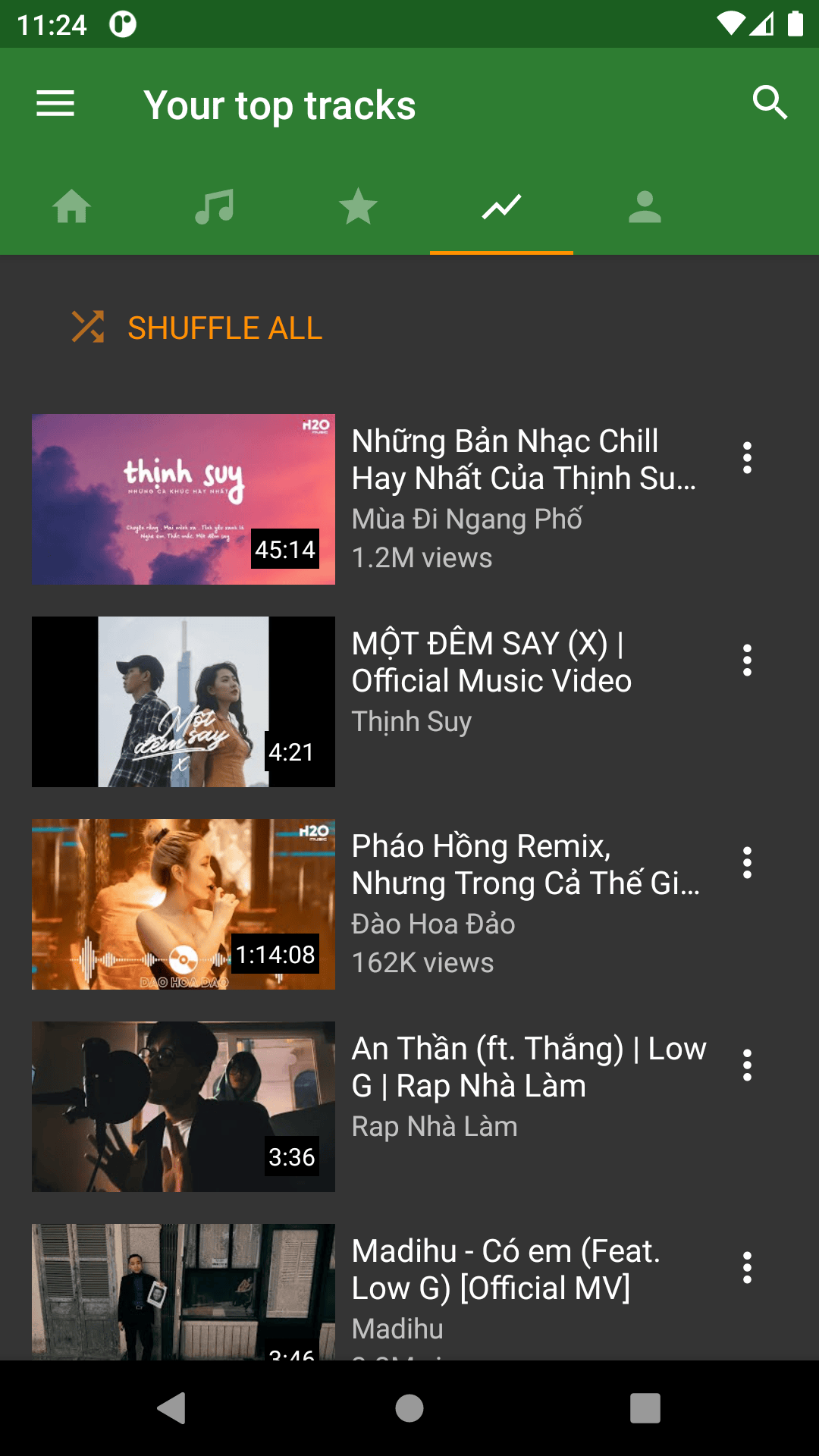
Your top tracks
Category tabs, a search control, Shuffle all and a list of video thumbnails are visible in the publisher’s preview.
App version unknown. Retrieved 13 October 2026. Original image.
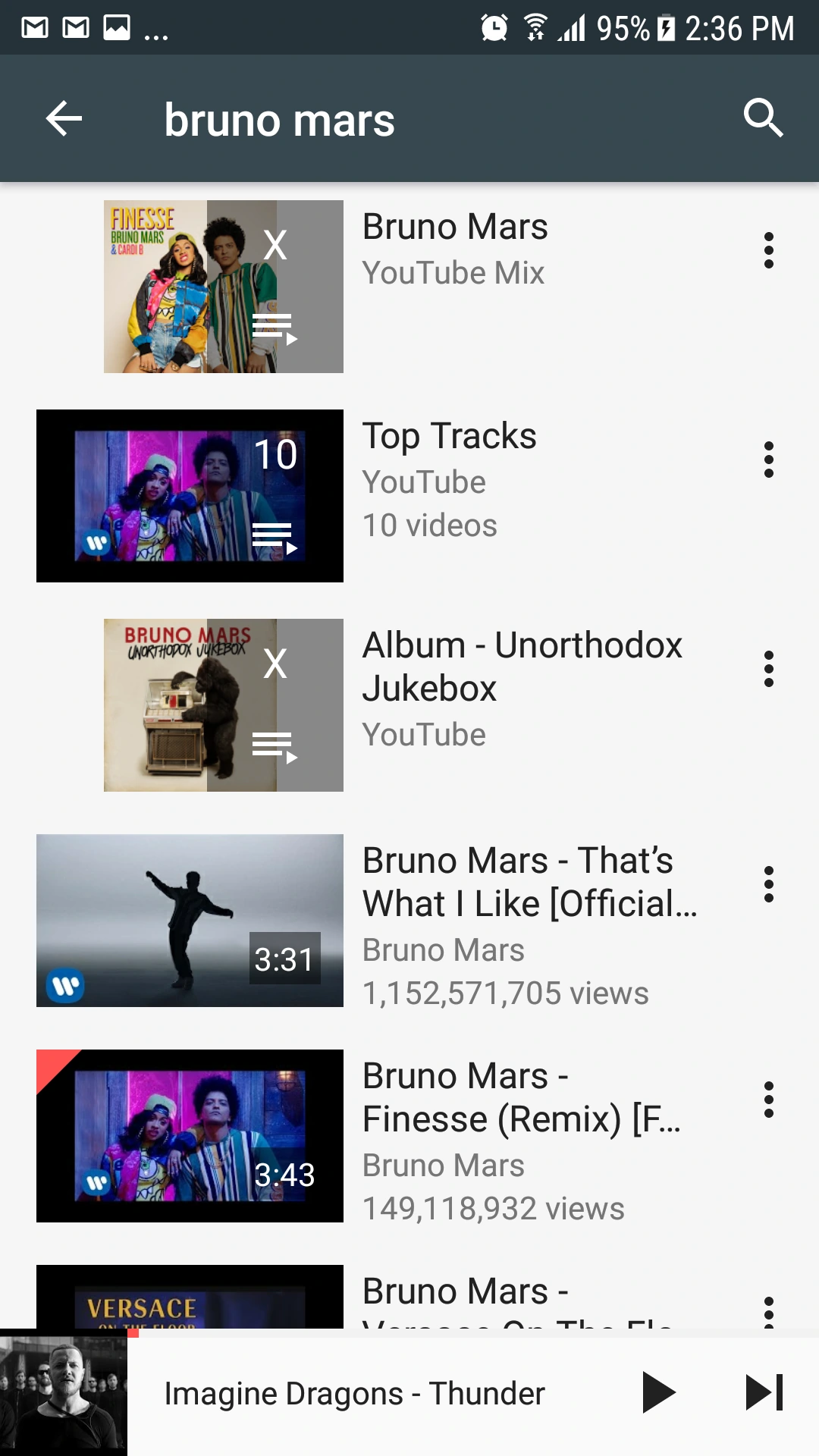
Search, mixes and playlists
This older screenshot shows artist search results, a playlist result and a mini player at the bottom.
Historical interface; exact version unknown. Developer source. Retrieved 13 October 2026.
These are genuine app images, not AI screens. Neither is presented as a tested screenshot of version 3.9.23. The headphones and lifestyle images elsewhere on this page are AI-created illustrations.
How to install YMusic APK.
- 01
Download from the publisher
Use ymusic.io and wait for the APK to finish. Check that you received an APK, not a webpage saved as a file.
- 02
Open the APK
Use your browser’s Downloads list or file manager. Android may ask for install permission for that specific app.
- 03
Read Android’s prompt
Keep Play Protect enabled and read any warning. Install only when the file and prompt are what you intended.
- 04
Check the installed version
Open YMusic, check App info and review permissions. Turn off temporary install permission afterward.
Illustrated overview, not Android screenshots. Already installed? Update YMusic without starting with an uninstall.

YMusic background playback:
start with a screen-off test.
Background audio is one of the publisher’s main feature descriptions. Before changing settings, play the same item with your screen on, then lock the screen and note what happens.
- If only screen-off playback fails, check YMusic’s app-specific battery and background-data access.
- On Samsung, check whether the app is in a sleeping or deep-sleeping list.
- If it also fails with the screen on, investigate the item, connection or app update first.
YMusic songs and playlists:
know what you’re saving.
Playing a song
An online stream still needs access to its source. A removed or unavailable item can stop working even if it remains in a list.
Saving a playlist
A playlist organizes references to tracks. Adding a song to a playlist does not automatically download its audio.
Downloading a file
A completed permitted download is a local file. Find the folder and test playback before relying on it away from a connection.
For a YMusic playlist download, first check which actions your installed build offers. We have not confirmed a whole-playlist download workflow in this build. If only single-track actions are available, handle selected items individually rather than assuming the complete list was saved.
Plan space before a large download.
Use a bitrate assumption to estimate audio size. This is a planning calculation, not a promise about YMusic’s offered formats or actual output.
Audio only; excludes APK, artwork, cache and temporary conversion files. Formula: tracks × minutes × 60 × kb/s ÷ 8,000. Inputs stay in your browser.
YMusic and YouTube Music
are different products.
An independent Android APK.
Publisher-described background audio, app-managed files and a separate privacy policy. Check its package and source when downloading.
Review the YMusic sourceGoogle’s music service.
Google documents Premium music background play and offline listening, with podcast exceptions and regional differences. It has supported iPhone and Android apps.
Understand the iPhone options“YTMusic” is often used for YouTube Music. Installing YMusic does not provide a YouTube Premium membership.
YMusic not working?
Choose the symptom.
“App not installed”
Check file completion, storage, the installer app’s permission and update conflicts.
Fix installation problems403 or unavailable content
Try a second item and compare with the original service before resetting app data.
Check playback errorsNo connection or buffering
Compare a working webpage, trusted Wi-Fi and mobile-data access.
Check network accessAn update will not install
Compare the package, signing identity and installed version before uninstalling.
Update YMusicIs YMusic safe to install?
The publisher-linked APK’s manifest, byte size, file hash and certificate were extracted. Its cryptographic signature was not validated, and no malware scan or real-device test was performed. Those limits matter more than a generic “100% safe” badge.
Read the app’s policy, review permissions and keep Android’s protections enabled. A file matching a dated hash does not guarantee safe behavior.
Review the exact evidence and permissionsAndroid, iPhone or a laptop?
Choose a platform route that actually exists.
Android
The checked APK declares Android 5.0 as its minimum. Newer devices may apply extra compatibility or background restrictions.
Android installation guideiPhone / Apple
This Android APK cannot be installed as an iPhone app. Similarly named App Store products are not evidence of a release from ymusic.io.
YMusic for iPhone explainedWindows / Mac
No native Windows or Mac installer was verified. An Android emulator is a separate environment; no tested emulator setup is offered here.
See supported service routesYMusic APK FAQs.
Versions, playlists, platforms
and the questions users search for.
What is the latest YMusic APK version linked here?
The publisher-linked file checked on 13 October 2026 reports version 3.9.23, code 4498. Recheck the publisher page for a later file. A “latest version” search snippet is not primary release evidence.
Does the download button open an APK file?
Yes. The button opens our download screen. After a five-second animation, the APK download starts automatically from /ymusic_apk. You can cancel during the countdown or retry if your browser does not start the transfer. The full file identity appears in the APK-details section.
Can YMusic download songs as MP3 or M4A?
MP3 and M4A labels are present in the inspected APK resources, and the publisher policy discusses downloaded files. Format availability and successful conversion were not tested. Choose an offered option for an item you may save and inspect the completed file. Read the format guidance.
Can I download a whole YMusic playlist?
A saved playlist is not automatically a downloaded collection. Whole-playlist downloading has not been verified for this build. Check the actions shown and count completed files instead of assuming every item was saved. Read the playlist download checklist.
Is there a YMusic Apple or iPhone download?
No native iPhone build from ymusic.io was verified. This APK is for Android. The App Store contains similarly named apps by other developers. See the iPhone compatibility explanation and Google’s supported YouTube Music route.
Can I use YMusic on a PC or laptop?
The supplied file is not a Windows or Mac application. An emulator could provide an Android environment, but compatibility was not tested here. For a supported browser-based service, review YouTube Music’s web route.
Where are YMusic old versions or version 3.9.11?
Third-party historical listings mention 3.9.11, but no publisher file and signing history for it were verified in this project. We do not offer an unverified old APK. The version and rollback guidance explains what to check first.
Is YMusic the same as YTMusic or YouTube Music?
No. This site covers package com.kapp.youtube.final from ymusic.io. YouTube Music is Google’s separate service. Its accounts, subscriptions and platform support follow Google’s rules. Compare YMusic with YouTube Music.
Does YMusic require a Google login?
The publisher policy describes both signed-out and signed-in use. Which account features work can depend on the app and service. The sign-in flow was not tested here. This website has no login form and never asks for a Google or YouTube password.
Can I use YMusic online without installing the APK?
This guide covers the Android app distributed by ymusic.io. The publisher website supplies app information and a download; a separate browser-based YMusic player was not verified. If you meant Google’s web music service, use YouTube Music. An online stream and a completed local audio file have different connection requirements.
Is YMusic free and ad-free?
The publisher exposes an APK download without a checkout on its page. That does not establish that the app is ad-free or that every add-on is free. Its policy names advertising and analytics services. Read the actual app policy rather than treating “free APK” as a Premium subscription.
Why does YMusic stop playing in the background?
First confirm it works with the screen on. If locking triggers the failure, review the app’s battery/background-data access and any OEM sleeping-app rule. If it also fails in the foreground, check playback and network causes. Follow the background checklist.
Why will YMusic not install or update?
A partial file, insufficient storage, installer permission, incompatible package or signing conflict can prevent installation. Read the exact error and keep Play Protect on. Start with the installation checks, especially before removing an existing copy.
Check the information behind the guide.
File facts come from the publisher-linked APK; screenshots come from the publisher and the developer’s archived reference. The feature labels were extracted without running the app. AI-created artwork is used only as illustration.
Initial research and writing were AI-assisted. Named human review is pending. Read the editorial policy or report a correction.
Download the APK.
Keep the guide handy.
Download the checked file, then follow the installation steps for your phone.